Showing posts sorted by relevance for query receipts. Sort by date Show all posts

Shopping receipts

Today I needed to return something.  I purchased the item in October.  Where was the receipt?  I didn't have to weed through piles of receipts.  I didn't have to worry if I threw it away.  I just went and got it!  My secret?
It's a simple accordian file, envelope size.  I put receipts from my shopping trips in here. There's an empty space in the back and I put my Christmas present shopping receipts there.  That's it.  Most likely if you need to return something you bought it in the past few months.  There's no need to super organize these receipts.  Just keep it simple.
Drop your receipts in here after each shopping trip.

*If this is a big purchase which you will be keeping warranty info, then attach the receipt to the warranty booklet and file that where you store like documents.

A year of de-cluttering-shredding

paper shredder tshirt 
The piles of "to shred" stack up pretty quickly in many homes because people think they don't have the time to do it, the shredder basket is full so they don't have time to empty it, or whatever.  

Your de-clutter challenge this week is to get everything shredded. Go through the piles you already have earmarked to be shredded.  Next go through the rest of your paper files focusing on what can be shredded.  
 How about inviting a friend over who also has a shredder and both of you can work on your shredding pile quicker?  

Here's some help on what you're looking for when going through your paper piles.  Shred papers containing:
  • Social Security number
  • Date of Birth
  • Signatures
  • Account Numbers
  • Mother's Maiden Name
  • Passwords or PIN numbers, other ID numbers
  • You may consider shredding anything with: name, address, phone number and/or email address 
If you don't have piles of papers but have full file folders, shred the following:
  • address labels from junk mail and magazines
  • ATM receipts
  • Bank Statements
  • Checks-cancelled, voided, from old accounts
  • Credit Card statements and receipts
  • Credit reports and histories
  • Employment documents-pay stubs, 1099s, reviews, etc.
  • Expired debit and credit cards
  • Expired passports, drivers licenses, and ID cards
  • Insurance policies and insurance cards
  • Investment/financials-records, transactions, statements
  • Legal documents
  • Medical records, bills, statements
  • Obsolete financial records, including loan applications
  • Pre-approved credit card applications and checks
  • Receipts for purchases
  • Report cards
  • Resumes
  • Tax forms, receipts (once you no longer need them for tax purposes)
  • Travel documents - itineraries, airline tickets, luggage tags
  • Utility bills - phone, gas, electric, water, TV, cable, internet etc.

 Go!


What documents should I keep and for how long?


VaryingThese documents you may touch as often as monthly or weekly:
  • Bank Statements - 1 month
  • Bills - 1 year for anything tax or warranty related, all other bills should be shred as soon as they have been paid.
  • Credit Card Bills - Shred immediately when paid.
  • Home Improvement Receipts - Keep until home is sold.
  • Investment Records - 7 years after you've closed the account or sold the security.
  • Leases - Keep until you've moved out and have received your deposit back from the landlord.
  • Paychecks / Pay Stubs - 1 year until you've received your W-2
  • Sales Receipts - Keep for the life of the warranty. Obviously, this applies only to major purchases like appliances and electronics. I typically keep receipts for things like groceries and clothing only as long as I know I am not going to need the receipt for a return.
  • Tax Documents - 7 years including your filing and all accompanying documents like W-2s and receipts.
  • Vehicle Records - Keep until boat, car or motorcycle is sold.

Make sure to have a flexible filing system set up to keep these documents in check and shred them when they are no longer necessary.

A Year of De-cluttering - finishing up February.

This month we have de-cluttered our desks, cleaned up our computers and email, and we'll finish up by creating zones at our home work space.

Think about all the tasks you perform at your desk and set up little zones.  My desk was purchased for my husband in the early 1990s.  I would love a new work area, but it's not in the cards, so I'm making due.  Here are my zones:


  • Office supplies.  My pens and such actually hang on the wall.  (This product was marketed in the baby section for bottles or something but it's marvelous like this).  I have a few more office supplies below my computer monitor.  This cosmetic organizer is not full and I love how my camera and phone can sit easily in it.

  • Daily files. In the pink Sophisticated File Tote are my daily theme files.  It's concealed yet staring right at me so I don't forget my habit.  Bonus:  It's portable when I need it to be!  Be sure to click the link to understand what daily theme files are.  
  • Clever Container. To the right of the tote are two document boxes.  These are for my Clever Container business and on top of the boxes is my Business Tracker for Clever Container.
  • Receipt Station. Under the document boxes is part of a receipt station.  I use plastic tabbed expandable folders for my receipts.  I have one for shopping receipts, one for my businesses and one for general tax deductions.  I also keep paid bill receipts in the divided file box.  Below that is a toy laptop to keep my toddler busy if I need to work and she needs company.  It's a special toy that stays here which makes it desirable.  
  • Periodicals. Next to my keyboard is a basket of periodicals.  This is something I do on my paperwork day.  I open to the pages I have earmarked, and take action.  Sometimes it's a website I want to look at, sometimes it's an article I want to bookmark online.  Then I recycle it.  
  • Storage. In the three clear plastic drawers are stamps, return labels, gear cords (separated into labeled ziploc bags) etc.
  • Frequent Reference. At the bottom of my desk is my pretty black and white file box.  This is reserved for things I need to retrieve often.  When my daughter broke her arm, I created a file for that and placed it here.  Now that it's tax season, my file with 1099s etc. are here. I also store the past year's tax return here.  Newspaper coupon inserts also go into a file here.  
  • Infrequent Reference. Behind this box is another box for things I do not need often.  For instance my file for warranty papers and instruction manuals are in it.  Receipts pertaining to each vehicle are organized in that box as well.  
  • Finally to the far right on the bottom shelf is where I keep my favorite Peter Walsh book It's All Too Much and where I keep my coupon organizer, address book, and desk calendar.  

These are all things I use every week if not every day.  For things I use sporadically, they are stored together in file baskets on a nearby book shelf.

So, that is a look at my desk and my zones.  Establish zones for your desk.  Basically, you need to create a home for your essentials.  Create zones for your paperwork.  Don't throw it all in a pile, a file or a box together. *GASP!*    

Supplies for the tasks you do often need to be at your fingertips.

Take a moment to visualize yourself being efficient and productive here at your workspace.   What is physically keeping you from achieving that visualization?  

Set up your zones.  I suggest clearing off your work area entirely to get started.  It's better to start with a clean slate.

"Having clear zones means more efficient work and a clear home for all like items."  -Peter Walsh

How to organize your receipts

I worked more on my desk area this week.  Little by little folks...that's one way to do it.  When you can't dedicate a big chunk of time, you break the big problem into small ones.  Simply see what's not working and try something you think will work. I have been having a receipt issue.  So I decided I need to sort my receipts better until I sit down once a week to itemize and such.  btw, I am not a photographer!
I started with these small Drawer Dividers.  They are a great length for receipts.  I got them from CleverHolly. They are in the closet section and are $10 for a pack of 3.  Here is what they look like once you quickly assemble them (they arrive flat).  (I also bought the bronze looking expandable pantry shelf for my desk...you can find it in the kitchen section at CleverHolly.)
Let me inform you that I am not crafty.  But I am a washi tape freak all of a sudden.  You should see my washi pinterest board!   So, I put a different style of washi tape on the end of my boxes.  
Then I labeled them for the receipts I need to tend to.  But I didn't like the way they looked with the plain label.
So, I used these crafty looking labels I already had and now I think it looks better.  


Isn't that totally fun?  Like I said, I am not a crafter and I did this super fast so it's not perfect.  But in 15 minutes I have a whole new and really cute system!

Organizing your "needs action" papers

When Clever Container came out with their "Panic No More!" filing system I was so excited.  The most common messy issue I see in homes is paper.  Panic No More was designed to handle the ebb and flow of daily paper.  It's not a permanent storage system.  These files were created to be emptied and addressed every single day.

The Panic No More System comes with 25 color-coded folders, 25 peel and stick file labels, 6 labeled tabs and hanging file folders, and instructions.  It is quick and easy to assemble all of these supplies.  It costs $23.

After throwing away all the junk mail, and separating your catalogs and magazines you're ready to use this system.  Look through your piles a little bit and take note of what's actually there.  Here is how Clever Container's Panic No More system works.


Throw away anything you no longer need each time you touch something.


Panic No More (pink) which includes five categories ("Call" is hiding in this photo).  

Pay: put your bills in here, you could include some dividers numbered 1-31, and drop your bills in by date.

Important: Things that need attention: permission slips, checking something online, forms to make copies of etc.
Call: (or any correspondence: Doctor appointments to be made, the seamstress,etc., keep a to do list in here so you always know who you need to call.), or change this to a ToDo,
Newsletter: or if you blog and run a few facebook pages, this is a good place to store ideas.  If you send out a regular mailing, like through mailchimp, this is a great place to keep an outline of the topics you want to cover.

Funny Money (green)
Coupons: great place to keep them until you can “process” them.
Coupons Non-Grocery: Ulta, Bed, Bath and Beyond, and such go here.
UPC/Rebates: this is a good place to store box tops for education inside a baggie or envelope.
Gift Cards/certificates: also great for groupons and such.
Receipts: Use this file weekly.  Store your receipts here until you "process" them.
Food For Tho
ught (orange)
Meal Planning: Temporary place to keep this week’s recipes and plan here.
Shopping List: Keep your shopping list in here so everyone knows where it is.  This is also a great place to keep separate and specific shopping lists: Amazon, Melaleuca, Sams, Health Food Store etc.
Recipes: Store next week’s ideas or recipes you just clipped.  But this is temporary and these recipes need to be processed into your longer term storage.
Memories (purple)
Cards: Is it worth keeping and to file it?  Love it, use it or lose it.  Keeping a card you received you wish to reply to goes here.
Letters: If you need to take action in response file it here.
Photos: Store here before you put away in a memory box etc.
Now, this is where's I'd change it up. I'd actually just make one file for each of my kids as that seems to be the memory type stuff that lands in a pile.
Medical (blue)
Primary: Scripts, referrals, claim info - keep here until this claim is closed.
Dentist: This is a great place to store your treatment plan.
Vision: Keep your scripts and Doc contact info here too.
Prescriptions: Forms you have to mail, coupons for a pharmacy can go here and it's a great place to keep drug fact sheets here. Script refill information should go here as well.
Flexible Spending: Store forms and receipts for flex spending here.
Further Action (gray)
To be filed: anything that needs to go to permanent storage, Schedule time on your calendar to file or this folder will be out of control. report cards,
Phone Numbers: contact info you plan to keep and need to put into permanent storage can go here. you can also keep a hard copy of Doctor's contacts etc. here.
To Send: What goes out: bills, invites, what’s ready to go to the post office, or cards that just need addresses etc.  

The 12 Tips of Christmas

 The 12 Tips of Christmas by Becca Clark
ConvenientlyOrganized.com


1.  Get in the Holiday Mood   -  If you need to get energized to start wrapping, decorating, and sending out cards, first take out the seasonal music or movies.  The familiar sounds will light you up, and suddenly you're ready to take on the holidays!

2.  Clear Out  -  Edit out the old the make room for the new!  Get rid of toys that children have outgrown, are broken, or which don't interest them anymore.  The same goes for the clothes closet.   If it's no longer used and/or loved sell or donate it.   Take advantage of the year-end tax deductions.

3.  Simplify -  Carry a small notebook around with you.  Write down thoughts and ideas immediately:  things to buy, to do, to call, etc.  This will free you from the nagging doubts and  the 3 AM worries that you forgot something vital!  Refer to the book often.

4.  Gifts  -  When you find something interesting in catalogs, flyers, magazine, or elsewhere tear out the page and put it in your Holiday Planner or a folder labeled "Gift Ideas".  If you're online either send it to Evernote (my fave), or print the page and add to your folder.  Keep the ordering info with it, and attach to your gift list with the name of the possible recipient.  This could be a year-round project that would make the holidays so much easier.  

5.  Receipts - Label a large envelope "Shopping Central", and put your shopping list, shipping info, and all receipts there.  Keep it in you Holiday Planner if you have one. This will make shopping and returns a breeze and help with budgeting next year.

6.  Gift Closet  -  Keep a supply of candles, boxed candy, wine, note cards, or other small items on hand to use as generic host/hostess, teacher, mailperson, etc. gifts.  Or buy poinsettias as soon as they appear in stores and use them to decorate your home until needed as a quick gift.

7.  Wrap it Up  -  Set up a temporary wrapping/mailing station in your home.  The process will be so much easier when you have everything you need in one place (tape, scissors, paper, gift bags, tissue, ribbons, etc.) 

8  Decorate  -  Take photos of your decorated areas to save time and decision-making next year. Keep them in your #1 box (see below) to guide you next year.

9.   Store - Consider giving decorations you haven't displayed recently to new homes.   Make a list of supplies you'll need for next year like wrapping materials, extension cords, replacement bulbs, etc.   Determine the kind and size of containers you need for safe, optimal storage (there are specialty boxes for light strings, trees, wreaths, etc.).  These containers can be scarce after Christmas, so stock up on any sales you find before then. 

10.  More Store  -  Store decorations by groupings: for example tree trimmings, mantle decor, etc., rather than scattering them throughout the storage boxes.  Label each container, and consider numbering them by priority.  "Box 1"  would contain things you want to unpack and use first, such as decorating photos, holiday cards, and special recipes.  Plan to store away other things that you only use during the holidays -  like serving platters and holiday dishes that are taking up valuable real estate in your kitchen.

11.  Guests  -  If you expect overnight guests try out the room by spending a night there yourself.  Pretend you're a hotel guest and review it with an outsider's eyes.  Is the bed and the room comfortable?   What items would you want - clock, nice hangers and hanging space, tissues, extra blanket?  Bring out those travel-size products to replace anything your guests might have forgotten. This is a great time to de-clutter the room too.  Remove the excess stuff that inevitably finds its way into seldom used rooms

12.  Plan for Next Year  -  The day after your celebrations, make next year's "to do" list while everything is still fresh in your mind.  Keep a list of things that were truly enjoyed, recipes that were a big hit, activities to skip (yes - it could be time to edit out traditions that no longer serve you), and tips for making next year even more special and fun!    


Thanks Becca!

Four tips to organizing paper


Keep important papers: Hang on to final credit-card statements, along with your W-2s and 1099s for up to Seven Years.

Among the additional documents you should retain: 

  • canceled checks and receipts for all deductible business expenses (such as those for entertainment, home-office equipment, and professional dues) - if you do not run a business shred these documents!
  • retirement-account contributions, 
  • charitable donations, 
  • child-care bills, 
  • out-of-pocket medical expenses, 
  • alimony, and 
  • mortgage-interest and property-tax payments.

Don't throw out the actual tax returns or the year-end summaries of your investment accounts, even after the chances of an audit have all but vanished. These documents don't take up much space and can come in very handy for future financial planning.  They'll take up less space if you do take the time to shred the supporting documents.  So as you go through your tax boxes from 2005 and beyond, shred or toss the receipts etc. that take up the bulk of storage space.  Then you can store all of your older returns in a single box.
 
It is crucially important to keep the confirmation slips that show beneficiary designations and the purchase price of stocks, mutual funds, and any other investments you hold; hang onto these records indefinitely because some day, says Slott, "you or your heirs will have to know exactly how much you paid to determine the profit on your investment for tax purposes."

 Give Your Papers a Home:  Keep your will, birth and marriage certificates, insurance policies, property deeds, and other permanent records in a safe but accessible place near your other financial documents, so you and your heirs will always be able to get to them quickly, if they need to.

Be Systematic: Have a plan for processing all paper. 

"Your goal should be to touch a piece of paper as few times as possible, rather than shuffling it from pile to pile," says Paula Boyer Kennedy, a financial planner in the Minneapolis office of Ernst & Young. "If you stick the bill back in the drawer after you pay it, it will find friends, and they will mate and produce offspring. Pretty soon, you'll have a true litter."

 Tackle the Backlog: Once you have a system in place, you still have to deal with all the piles you've already accumulated. Instead of launching a massive reorganization, start by sorting through a small stack at a time. You can allot half an hour a day to sift through old papers, perhaps while watching the news or listening to music.


Making over your home office tips

If you pay bills or have papers you need to save, you’ve probably set aside a space in your house as the “home office” area. Whether you have a desk in a corner or a whole office to call your own, here are a few ways to keep it running smoothly and efficiently.
1. Get your papers organized.
A significant issue with home offices (and any home) can be the accumulation of paper. Bills, coupon books, newspaper—you name it, it’s probably stacked up around your house at some point. So what do you do? Get it organized as soon as it enters the house.

When sorting papers, home organizers often use the rule of three: “to file,” “to do” and “to read/decide.” Use this method to sort the daily influx of papers, bills, and so on. Whether you stack them side by side or use a few plastic dividers, do this every single time you come home. Receipts, paid statements or tax documents go in the "to file" space. If the item needs attention, like a bill, it's a "to do." If you're not sure or simply don't have time to decide now, then it goes in the "to read/decide" space. Set aside ten minutes every Saturday morning to sort through the stack.

2. Start a filing system.
Now that your desk is (mostly) clear, you may be looking at that “to file” stack. If you don’t already have a filing system, now is definitely the time to start! Use a desk drawer made specifically for files, or use a few storage boxes and folders. Start a file folder for every category you think you need—statements, tax documents, receipts, school papers from the kids. Then, in each file folder, use a few manila folders to separate the categories further. In your bill statements folder, for example, you might keep bills for cable, electricity, and heat—so use a manila envelope within the folder for each. Once you’ve started a system like this, dropping in “to file” items will be a breeze, so your desk should always be clear. Plus, you’ll know exactly where everything is if you ever need to reference any of the documents.
3. Make your own office organizers.
Instead of buying expensive, labeled boxes to store items, make your own! Cover shoe boxes with leftover wrapping paper or fabric and cut down to fit your drawers, then fill with your excess office supplies. Label storage containers with self-adhesive labels or print your own and cover with clear packing tape. If you have a larger shoebox (like from those boots you bought over the winter), cut it down to size, decorate, and use it lidless as a place to store blank printer paper or notebooks.

Coffee cans are easily decorated with contact paper, scraps of wallpaper or fabric, and are perfect for storing markers, scissors and craft supplies. Soup cans are the perfect size for holding a few pens and pencils.
4. Have a bulletin board or chalkboard.
Whether you hang them or prop them up, bulletin boards and chalkboards are the simplest organizational tools around. Pin up things that you need to notice, or use magnets with a chalkboard. Get out that hot glue gun and fabric snippets to dress up thumbtacks or magnets. If you do have a designated area for a home office, think about getting a quart of chalkboard paint, taping off a section of the wall in your home office, and painting a chalkboard right onto the wall. You can use it to scribble reminders, important dates, and other information! Bulletin boards are also great ways to sort your to file, to do, and to read/decide piles—pick a space at the bottom, then designate a pin for each category, then tack new mail or papers to each category. 

5. Keep it clean.
Computers and electronics are natural dust magnets. Use your vacuum's brush attachment to remove dust (and all manner of crumb accumulation) from every surface on, around and under the desk area, including the office chair. Don't use it on the monitor—instead, use a dusting cloth and cleaner specially designed for television/monitor screens.

Once you have everything clean and organized, keep it up! After the initial clean-out, you now have an efficient system of filing and organizing, so stick to it. Your desk will stay clear, and so will your mind. And now you're on your way to the fun part of the home office makeover: decorating! Stay tuned for Part 2, coming next week!

-Vocalpoint

A Year of De-cluttering in February continues

Don't let your email control you!

You have thousands of messages in your email inbox don't you?  It's our goal this week to take care of that.

To complete this task make a commitment to actually do it.  Plan on it taking up some of your time (which you will soon gain back).  Schedule this time in!  You also need to plan to start new email habits.

Purge Part One:
Open up your main email inbox.  Tell your inbox to show you the oldest emails first.  Gasp audibly and shake your head.  Remind yourself of your new goal to be organized with your email and why this is important to you.

The easiest way to de-clutter your email is to delete these old emails.  If you haven't needed them the past few years, you probably don't need them period.  Do a google search for your email program on how to delete years worth of old emails.  If you really think you need to glance at last year's old emails then perform a massive delete up to 2011.

Purge Part Two:
Again, tell your inbox to show you the oldest emails first.  Notice emails from lists you subscribe to like Hobby Lobby, Shop It To me, MeetUp Reminder etc.  If you seldom open items from these subscriptions but don't have time to remove yourself right now, begin making a list of  those you need to unsubscribe.  Say Hobby Lobby is something you see in your inbox and it's something you want to continue getting, then do a massive Hobby Lobby purge.   You can do it by searching or by using a filter.  There goes 150 emails into your trashcan!  Woohoo!  Continue this process over and over.  It will take a while.

You will begin to notice emails you never ever open and emails you seldom open.  It's time to take control of your email isn't it?
Source: happyplace.com via A on Pinterest

Create A System:
Set up folders within your email system.  Your folders might be Banking, Receipts for orders, Photos, Stupid Jokes, etc.  If you can learn how to set up your filters to train emails to automatically enter these folders, especially the folders you seldom need to look at, DO IT!  It is absolutely worth the set-up time!

Start new habits:
Every time you open your inbox follow the well-known F.A.T. plan -File, Act, Toss.  Got an email for something you just purchased online?  Move it to your "Receipts for purchases" folder.  Delete what you don't have time to look at or don't care about immediately.  If you need to respond to an email and can do so in 2 minutes or less, do it now.  If the response requires some time then tag it.  Schedule time in your calendar to take care of these tagged items because they are important and you don't want to forget them.

Continue to unsubscribe from lists you simply don't have time for.

Finally, limit the amount of time you check your email to once every few hours at most.  If something is urgent there are other ways for people to contact you.

Once last thing, limit the amount of notifications you are getting from Social Media.  Taking 5 minutes to set up these perimeters will save you hours.

Organizing your small business taxes


Tracking Business Expenses

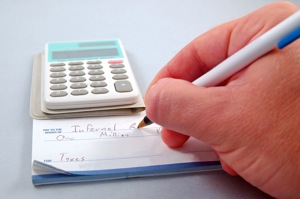
writing checkBy Sara Pedersen

Are you taking advantage of all the deductible business expenses available to you as a small business owner? Some expense categories for a professional organizer may include the following, but consult an accountant for a complete list of deductible expenses unique to your business.
  • advertising (printing marketing materials, Google AdWords, print advertisements, etc.)
  • car expenses (mileage OR repair expense if used exclusively for business purposes)
  • dues for professional organizations (like NAPO, POC, or ICD)
  • gifts for clients up to a max of $25 per person
  • educational materials and classes specific to your job (books and magazines on organizing, webinars, teleclasses, conference fees)
  • home office (may include portion of utilities)
  • internet services, business phone expenses, web site hosting and domain names 
  • insurance for your business
  • interest and fees on business-only credit cards, bank service charges
  • legal and professional services (accountant, lawyer, marketing consultant, etc.)
  • office expenses, small equipment and furnishings
  • supplies
  • taxes and licenses
  • travel and meals related to business
Be sure to save receipts for all purchases. Highlight the date, price, and type of product/service on each receipt. You can file them in an expandable wallet folder, group them by month or type of expense in separate 6x9 envelopes, or stack them neatly in a box. Or go paperless by scanning them with a product likeNeatReceipts. There are many ways to store receipts, and you'll need to determine which method works best for you. The most important thing is to have a system so everything stays organized throughout the year. You might check out some of the newest apps that allow you track your business expenses right from your smart phone or tablet. XpenseTracker is one to try.

If you have a separate space within your home that you use solely for business purposes (your home office), you may want to investigate the home office deduction. It can be a great money-saver. And when you claim the home office deduction, you can claim the miles driven from your home to a client's or other business stop. (If you don't claim your office as a deduction, you cannot claim business miles starting at your home as that is considered "commute" miles.) 

Remember that you need to formally track your business mileage in a log book or computer program like Excel or Quickbooks. Or consider one of the easy-to-use apps for your smartphone. Search for "mileage log" to find apps such as MileBug, which can even automatically calculate your mileage using GPS technology!

When in doubt, consult an accountant for full details. Even if you do your own taxes each year, it might be worth it to schedule a consultation with a CPA to make sure you're maximizing all potential deductions.

Copyright 2012 Time to Organize® LLC


The cure for a messy desk

Have you heard about NeatReceipts or NeatDesk?

The Neat Company has developed powerful scanning and software solutions that transform printed text into digital information you can use. You can keep track of receipts for your business, scan and file any kind of document, and convert business cards to digital contacts. Think of it as a digital filing cabinet to organize and store all your important information.

How long should you keep documents?


How long should I keep documents?

Auto Records - While active (As long as you own it. Hold on to sales transaction data for 6 years after the car is sold or traded)
Insurance Policies - While active (After you receive the updated police, shred the old)
Warranties & Contracts - While active (Toss when expired)
Paid Bills - While active - After payment has gone through the bank you can shred them. but for insured purchases, keep paperwork as long as you own the item.
Paycheck Stubs - One year (just make sure you W-2 matches)
Quarterly Investment Records - One year (to confirm your annual statement is accurate)
Credit Card & Bank Statements - Seven years (proof if you file an insurance claim & as backup for taxes.)
Receipts & Documentation for Tax-Deduct. purchases - Indefinitely (If the IRS believes you have underreported you income by more than 25 percent then they can go back as far as the want).
Tax Returns - Indefinitely
House - Related Records - Indefinitely (closings, deeds, assessments, & home-improvement expenses)
Most IRA contributions - Indefinitely (proof you already paid taxes on this income)
Annual Investment Statements - Indefinitely (Until you sell the securities.)

A year of decluttering - a pile of papers!

With many of our purchases we also gain a manual and/or a warranty, you know, more paper you need to find a home for.

I simply keep mine in a file and when I add something to the front of the file, I grab a handful of items in the back of the file and make sure I still own those items.  If I do not, I toss the papers. If I do, I place them in the front of the file.

This helps me to maintain the file.  And it's not a crazy intricate system that requires much of my time.

Since having kids I started an additional file for toys and such.  Now I have two files for Warranties/manuals with receipts attached to them.

That's one way to create a home for these papers.

Some people prefer to set up binders filled with paper protector sheets in which they fill with the Warranties and such.  Some people go so far as to organize these into categories.

But we're here today to declutter.  So, for those of you who find you have a stack of such papers or an un-maintained drawer/file full of them, this challenge is for you!  This is a job I as a Professional Organizer can't even really do for you.  

Your job is to tackle this pile.  All you are doing is recycling warranties and manuals of items you no longer have.  That's it.  

This may require help from your house mate.  After all, there are things you won't know if your husband still has or not.  Create a pile for him.  You may have to create a pile for "?" and you will have to look through your things to see if you actually have that item or not.  And if you didn't know you had it and you find that item, I suggest you attach the manual to the item and donate it ASAP!

Turn on some great music and tackle your papers.  This is a job that you can easily do in time increments or all at once.  

If you have no home for such papers at all, just do what I do and create a simple file folder them to be stored.  If you feel you'd like to upgrade your system do it later.

First just keep it simple!

Reclaiming our spaces: My vehicle!


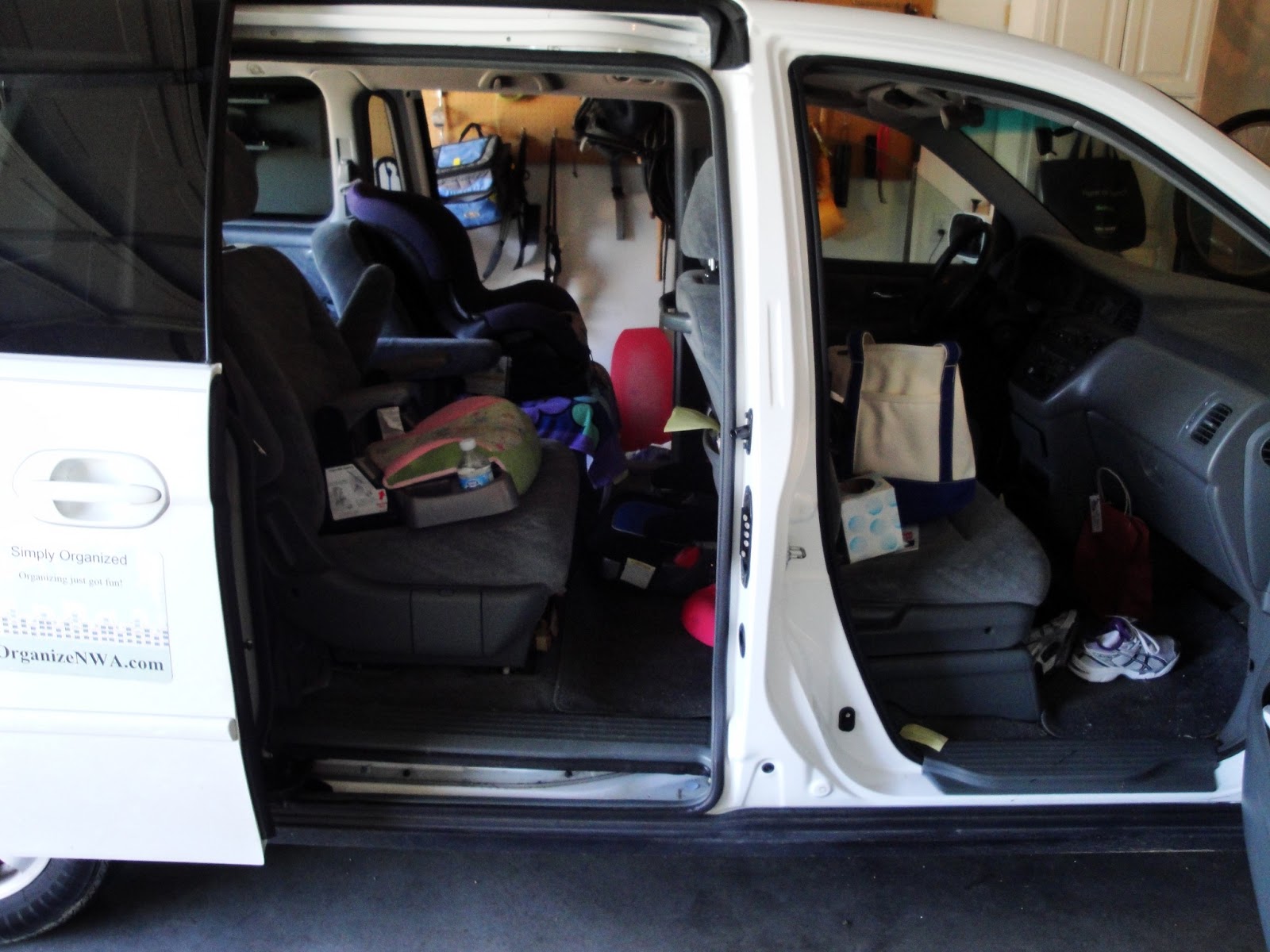
The end of the school year and beginning of summer seemed like a good time to tackle my car.  I was working with a client one day last week and I needed to pack out my van with her donations so once I had dropped off the load I felt like it was the best time ever to clean out my vehicle.  I mean, after it gets hot I always use the heat and humidity as a legitimate excuse.  
So, I took everything out and used my dust buster.  I learned I need a new one.  I keep saying I need to replace it because it's not doing very well and it has a hard time charging but I could hardly vacuum up the spaces very well.  I managed to get most of the crumbs out of the seats and emptied my 7 year old's kleenex box that works so well as a trash can.  I had her help too.  And I called it "good enough" as opposed to hauling my girls to the car wash to use their vacuums which are loud enough to freak my youngest out.
I took out my handy little container called the StuffIt.  I have a Honda Odyssey (04).  And I need a lot of things within arm's reach.  I am only 5 feet so I can't reach very far.  This little girl (Miss Dotty) is not only super cute and easy to wipe down she's ADORABLE!  I have been using it on the floor between the front seats for a year and it looks brand new.  I wiped it down, de-cluttered it and refilled it.
I keep suckers, business cards, pens, CDs, highlighters, hairspray and my mileage log here.  I haven't been so successful at keeping track of business mileage until I put Miss Dotty into my car.  
I also use the SwingAway to keep me organized.  I emptied this out and threw out old coupons.  I always keep a Clever Container catalog in here, a pad of paper, and restaurant coupons.  File folders fit in here well too.  When I go to work with an organizing client I put their file in here before I leave.
And I love these car hooks that slide around my arm rest poles.  My 3 year old's diaper bag is always easy to find.  My 7 year old likes to hang a dainty purse on them as well as a large pretzel while she buckles up!  
My auto is far from looking detailed but the thick layer of dust is gone and every time I get behind the wheel I smile. Cleaner makes me happy.  

When cleaning our your vehicle don't forget all the cubbies.  I forgot to have my daughter go through hers in the far back.  But I did go through my glove compartment.  I took out all the gas receipts to be filed with taxes and just left the necessities in there.
Do you need to reclaim your automobile?  Just work in one area at time. I started in the back and ended at the driver's seat. Arm yourself with two bags. One for trash and one for items that need to be put away out of the car.  Anyone who uses the vehicle needs to participate.  
I thanked my helpers for doing their part by having a "tailgating party" :)

See what Jacqueline worked on this week at Creative Outpour!

How to always find your wallet and keys

Are you having panic attacks at the cash register because you can't find your wallet?  

How long have you had your wallet?  I have never in my life spent so much on a wallet as I did in 1992.  I bought a small real leather Fossil brand wallet for probably $30ish.  That was like $100 to me back then and I felt kind of bad about spending that much money on it.

I chose it before I owned a single credit card and debit cards were non-existent.  It was the wisest choice I ever made and I totally got my money's worth.  I have used this little black wallet for 20 years.

20 years.

That's a kid's entire school career.

It's outlasted many marriages and endured my one.

The only sign of wear is from the dog we had briefly. She chewed a little bit of it but I caught her before the damage was too terrible. I am dead serious that it's almost the only sign of wear.  Even the snap works fine.

After all these years I'm saying goodbye, at least for now.  As a Mom of two with four "side" jobs I am frustrated because I can never find my wallet.  It is ALWAYS in my purse but there's a lot of other stuff in there and this little black thing gets lost...even though I purposely buy purses that are not lined in black so I can find it.
Lately my semi-disorganized purse has been bugging the fire out of me.  I can't take another false freakout at the check-out register.

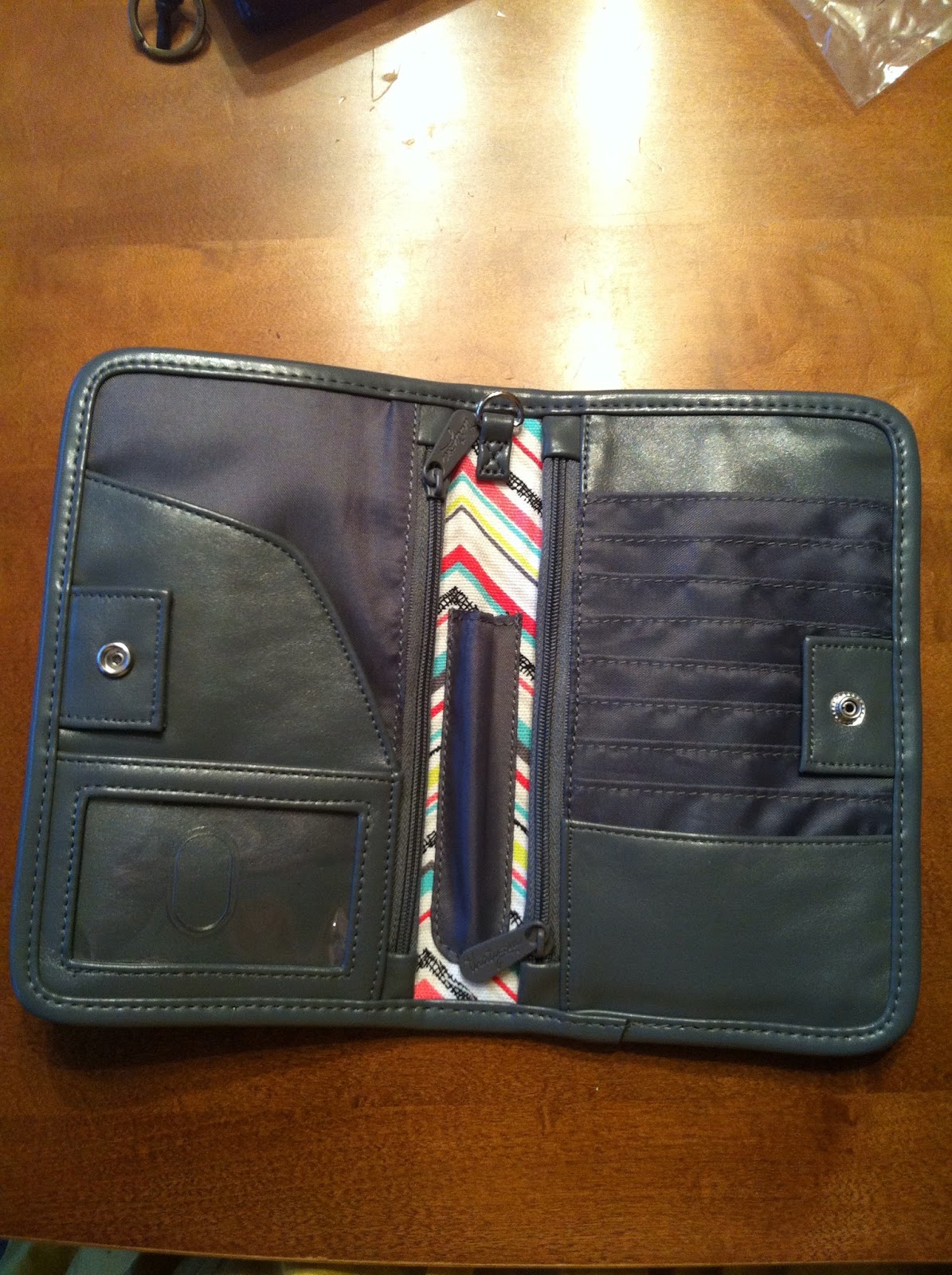
My friend Amanda at 31 showed me her wallet and I gasped out loud because it was exactly what I was looking for.  I ordered it and got it in about a week.
I chose this fun fabric design because I knew it would be easy to find even if the inside of my future purses were black.  So, here's two pockets with zippers on the outside which is perfect for change.  Guess what?  My iphone covered in an otterbox can actually fit inside the top zipper pocket.  I can not zip it in, but it fits there nice and snug.
On the inside, both sides have zippered compartments.  Underneath each of them is another pocket!  My otterboxed phone can also tuck inside one of these pockets and the wallet can button.
I am mostly loving that I have the perfect temporary spot for receipts!  Seriously, this was a big messy issue in my purse until now!

What about standing in everyone's way at the store's doorway as you search for your keys?


To solve the panic of not finding my keys which are also always in my purse, I bought an inexpensive key fob from my friend.  Not only can I find my keys quickly, this polka-dot cutie envelopes my wrist easily when I need to use my hands!   And the fashion bonus is that these two patterns complement each other and I hadn't even thought of that.  It's also very lightweight and I don't notice it when my keys are in the ignition.

How do you keep your purse organized and panic-free?

Here's my 31 wallet style and fabric choice which you can get from Amanda:


Related Posts Plugin for WordPress, Blogger...