Small nudge for 2019
Need a nudge to get a little organized? Start with a "duplicate sweep". Fly from room to room focused on duplicate items and lighten up. How many pillows is enough? How many rice vinegars do you really need? How many sets of measuring cups can you get by with? If you are unsure about getting rid of a duplicate store it in a tub or box for 30 days and see how you do :)





Can Hellmann's new mayo bottle simplify your life?
I've told you before that sometimes companies will reach out to me and ask for a product review. My angle is always asking, "Does it make life more simple or help me be more organized?"
This latest review may seem strange on this site because it's for Hellmann's Mayo. The reason I wanted to do this review is because they have a new squeeze bottle!!
I do not personally use mayo a lot. I mostly use it to make dips.

Let me just say it took me about 2 seconds to squeeze out 1/2 Cup of the mayo and I created zero mess getting it out.
Hellmann's is touting its precision tip, clean-lock cap, and sleek design.
I tried to draw and write with this bottle but I did not succeed. Others have, I did not. But my little one was happy with the little dab I gave her in the center of a cracker.

-Holly
This latest review may seem strange on this site because it's for Hellmann's Mayo. The reason I wanted to do this review is because they have a new squeeze bottle!!
I do not personally use mayo a lot. I mostly use it to make dips.

Let me just say it took me about 2 seconds to squeeze out 1/2 Cup of the mayo and I created zero mess getting it out.
Hellmann's is touting its precision tip, clean-lock cap, and sleek design.
I tried to draw and write with this bottle but I did not succeed. Others have, I did not. But my little one was happy with the little dab I gave her in the center of a cracker.

Does this product help simplify your life? YES! (I wish all my condiments had this bottle now)
Does this product help you be organized? YES! The slim bottle takes very little space in my condiment-crowded refrigerator. The click lock cap keeps the bottle and your fridge clean.
I compared this product with a generic brand of mayo I already had. The generic brand contains HFCS, the Hellmann's contains sugar. If that is an issue for you, Hellmann's has your back.
Hellmann's also states it's on a mission to use 100% cage free eggs. They are not there yet, but they say they are trying. The bottle also touts that it is rich in Omega 3s.
So, thanks Influenster and Hellmann's for sending me a complimentary bottle of Real Mayonnaise.
Thanks readers, may your summer picnics and at-home lunches be less messy!
Lent, #40bagsin40days, and a spending freeze

Are you observing the season of Lent? My church spends a concerted effort in following the church calendar. I have never been a part of a community that sincerely observes seasons of Advent and Lent like my current one. Some times I succeed at my sacrifice and sometimes I fail.
One year I gave up High Fructose Corn Syrup because I felt I was addicted and it was bad for this temple I call a body. I did better than I expected and appreciated having an older friend trying to give up soda at the same time. There's something to be said about going through things with a buddy.
Another year I was going to follow Spring Cleaning 365 because I so badly needed more control of my environment. For some reason I didn't do so well. One hint is the tasks were decided for me and not in a time frame that worked for me and I also didn't schedule in the time for it. However, that year I also prayed this prayer every single day. It focused me in so many ways and enriched me.


I see all kinds of photos full of bags of excess going to the landfill and charities. While I am truly happy people are freeing themselves of excess, something else really tugs at me. All the questions come.
Will these people change their ways?
Will these people be in the same boat next year?
Does the world really need their crap?
But I also thought, I could really stand to decrapify my own life. And I asked myself these same questions.
My observance of Lent in 2015 is two-fold. I have joined the #40bagsin40days, although I will not have enough to fill 40 bags. My items will go into a garage sale for our church who needs funds to renovate our new-to-us meeting place.
But I am also putting myself on a spending freeze (I learned this from my friend Natalie). Our biggest problem here in America is that we buy too much to begin with. We let too much enter through our doors. That applies to all aspects of our being: our homes, our cars, our email boxes, our phones, our heads, our hearts, etc. Like many, money often controls me, not me controlling my money. And I want to fight this. I want to be a better steward. I know more stuff means more to manage.
"Every time you spend money, you're casting a vote for the kind of world you want." Anna LappeThere are so many reasons for each person as to why we purchase more than we need. Sometimes the root of the action is being tired, not planning, or filling a hole we have. Everyone is different. I have been wanting/not wanting to put myself on a spending freeze. So I've been contemplating it for a while. For me it means not spending outside of my budget and mostly not making unplanned purchases. It sounds so easy. But it's not easy for me. I do feel these actions of decrapifying and a spending freeze go hand in hand.
And you know what? I am resting on that Prayer again. My needs are provided for. I choose to be generous. I want to pursue what matters most in my world. I want to live free.
Does this resonate with you? You can join along. Anne Marie has a free printable for you to jump in on the decrapifying. I urge you to do more than just get rid of your junk. I urge you to look deeper as to why you have "crap" in the first place and I urge you to examine what your days would be like if you consumed less.
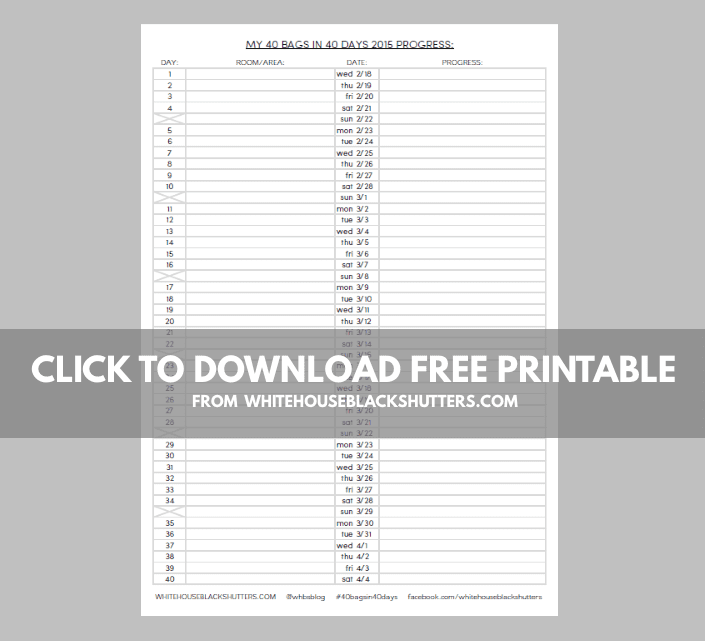
I am taking this slow and I am doing it by category, not just by room. I started with books and have only done one area of books at a time. So far I have gotten rid of 15 books.


My list consists of books, clothing, pantry, laundry, digital photos, electronic and paper files, bathrooms, google docs, dress-up clothes, toys, playroom shelf, each daughter's room and closet. There is certainly more that didn't make the list. Maybe I'll keep going after Lent. Maybe I won't. We'll just see.
If you join along with the #40bagsin40days and/or a spending freeze. I'd love to know! You can always tag me on IG as @ahappyholly.
Lent, is a time to enter into the dark places within our souls. We are invited to allow the Holy Spirit to search us and to know our hearts. We call attention to the things that bind us up from living out the reality of the Kingdom of God and attempt to starve them. In a nation of affluence and values that often corrupts the beauty of the cross, sometimes our gluttonous lives need to have a time to experience a hint of starvation.
Subscribe to:
Posts (Atom)
